
Hello! This is a question gadgetmanBrian reader LS recently asked. He has a friend whose iPhone simply wont ring, and all calls go directly to voice mail. She has checked the ringer settings, the mute switch, and everything looks like it should ring, but multiple callers have reported that they do call, but the calls always go to voice mail.
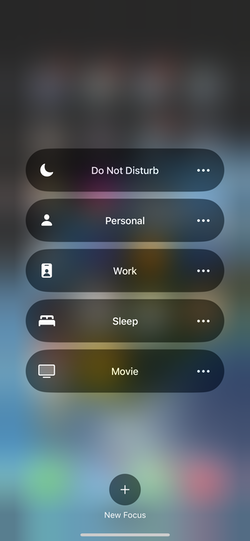
There is actually one simple thing that is the most common cause of this happening; the phone is set to ‘Do Not Disturb’, and that was the cause in this situation. ‘Do Not Disturb’ is part of ‘Focus’; a set of ways to silence calls and notifications depending on your situation. As an example, Movie, Sleep and Work are some of the built-in Focus modes; these can be customized and are a powerful way to control how you interact with your device, and can be found under Settings -> Focus.
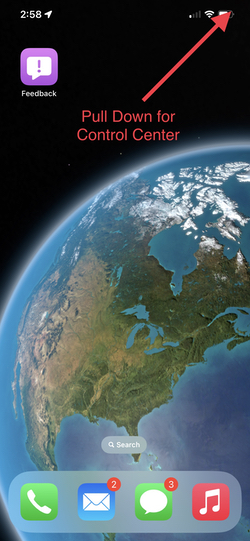
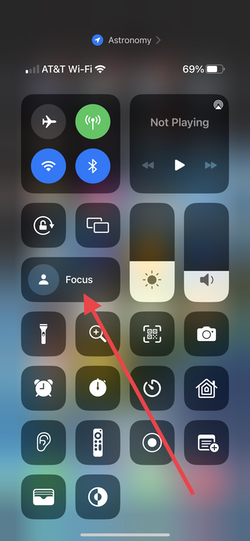
You can check if your device accidentally went into Focus by looking in Control Center, which you access by pulling down from the top right corner of the screen (pull up from the bottom of the screen to dismiss). The Focus section will expand when you tap on it, and any active Focus will be highlighted. To turn it off just tap it, the highlight should disappear and you will get calls and notifications like normal (see below).

Enjoy!
 gadgetmanBrian | Personal Technology