
Hi gadgetmanBrian readers! Today’s tech tip is about an amazing health & safety feature of the Apple Watch; Fall Detection.
By combining sensor data when your Apple Watch is on your wrist, the watch can detect if you have fallen. It displays a notice about this and gives you a quick way to call emergency services (911 in USA).

However, if the watch detects you have not moved for one minute, it will automatically call emergency services. During this minute the watch will actually try and wake you, by tapping your wrist and sounding an alert with increasing intensity. After calling 911, your watch will send a message to your emergency contacts (Medical ID in the Health app) with your location letting them know you’ve had a hard fall and emergency services have been called.
Keep in mind fall detection is not absolutely foolproof. It not guaranteed to detect falls, but it can be a useful addition to your overall health protection.
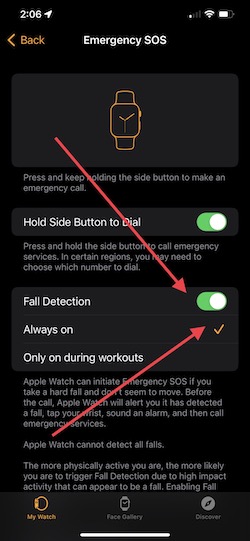
Fall detection is not always turned on by default, so below are easy steps to make sure fall detection is active and providing you protection…
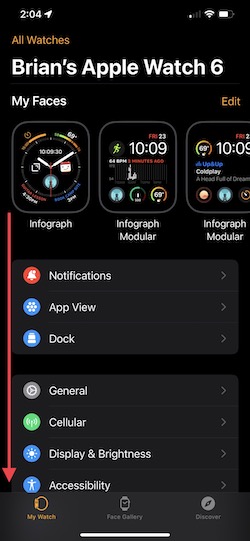
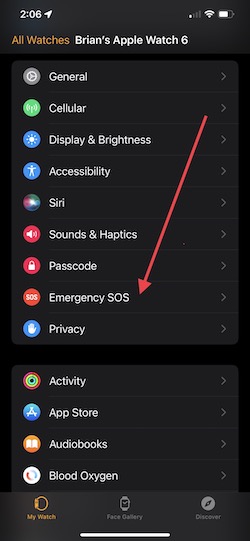
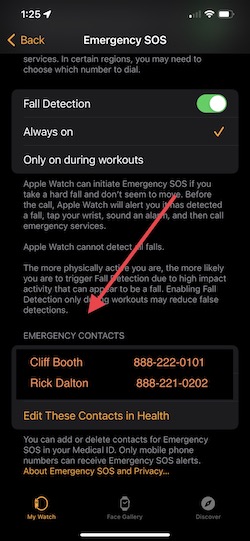
Open the Watch app on your iPhone, scroll down to and click on Emergency SOS. Make sure Fall Detection is on and set to Always on, see below. You can also access your emergency contacts at the bottom of this screen.
That’s it! Hopefully you’ll never need this feature, but it can give you peace of mind to know your Apple Watch is helping protect your health.
Enjoy!
 gadgetmanBrian | Personal Technology