
Hi gadgetmanBrian readers! Today’s tip is about the iPhone Safari address bar; the default position was recently relocated to the bottom of the screen, see below. Moving the address bar to the bottom allows it to be integrated with the rest of the Safari controls, and provides a convenient way to simply swipe left or right on the address bar to quickly move between open tabs.
Many readers have shared that they miss the old position of the address bar at the top, but fear not; there is an easy way to switch it back to exactly like it was before.
Just tap the aA button at the left of the address bar, and a pop up menu will appear, see below…

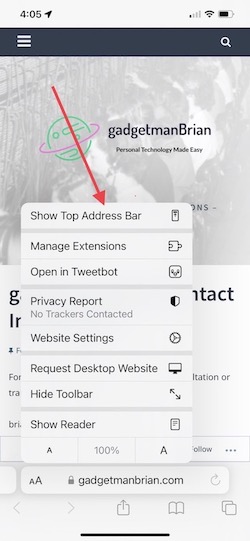
The top item is ‘Show Top Address Bar’, just tap it, and the address bar is back on top.
Tap aA again and the ‘Show Bottom Tab Bar’ menu item (at the bottom of the list), allows you to change it back to bottom address bar.


I’ve kept my address bar at the bottom; I like the ability to easily swipe between open tabs.
And yes, there are a bunch of other interesting-looking items in the aA menu; these will be topics of future gadgetmanBrian tips.
Enjoy!
 gadgetmanBrian | Personal Technology